Support Team Assistant App
This lightweight system tray app makes it effortless for users to contact their IT support team. With just a click, it opens a simple interface to send pre-filled support requests—no digging for email addresses or writing lengthy messages. Designed for speed and ease of use, it streamlines the support request process, saving time for both users and IT staff. Ideal for internal IT departments or MSPs, this tool helps reduce friction, boost efficiency, and ensure no issue goes unreported. Simplify support. Improve response time. Keep everyone focused on what they do best.
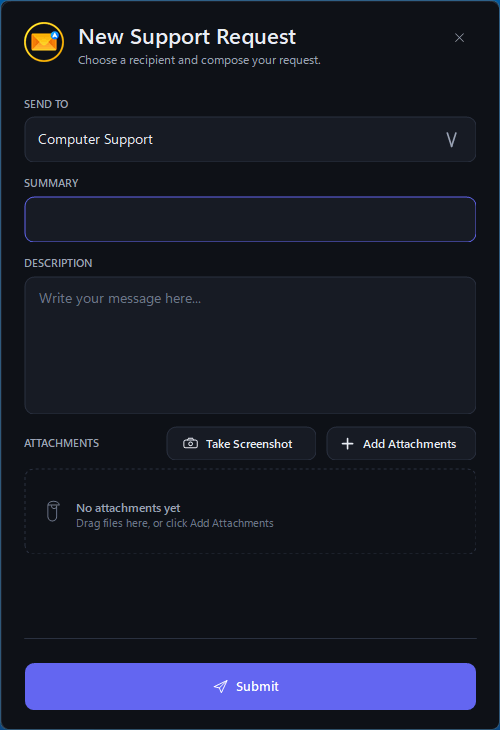
MANUAL INSTALLATION INSTRUCTIONS:
1. Download the app to your desktop
2. Run the app and configure the email and recipient settings for your network
ENTERPRISE INSTALLATION INSTRUCTIONS:
1. Run, configure, and test the app on a template computer
2. Right-click the system tray icon, choose settings, go to the Recipients tab, and save the settings to an XML file named "config.xml" (or customize the included config.xml template)
3. Edit the XML file in Notepad and overwrite the encypted password with the plain text SMTP password and change passwordProtected="true" to passwordProtected="false"
4. Write a batch script that does the following and deploy using Group Policy or PDQ Deploy:
A. Copy the executable to the public desktop folder so all users can see it
B. Create the following folder: C:\ProgramData\Support Team Assistant\
C. Copy the config.xml file to the newely-created folder
TO UNINSTALL:
1. Delete the .exe from the public desktop manually or using a script
2. Delete the following folder manually or using a script: C:\ProgramData\Support Team Assistant\